inDrive Taxi and Delivery | Download Official App in Pakistan (2026)
September 22, 2026
208 MB
V11
Android 6.0+
300

Description
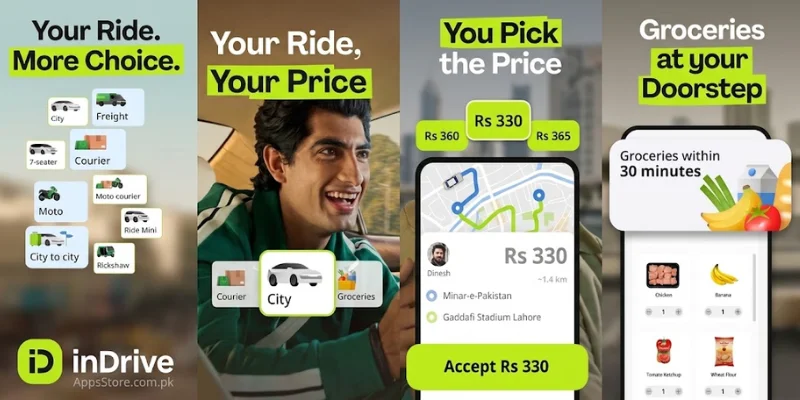
Today, digital transport and logistics solutions have completely changed the way people travel and send goods. Smart mobile applications have replaced traditional taxicabs and local transport agents. When it comes to affordable daily commuting, intercity journeys, and urgent parcel transport, inDrive formerly known as in Driver stands out as one of the most innovative platforms in the market.
Unlike standard ride-hailing services that rely on algorithm-driven algorithms and hidden surge pricing, This application introduces a unique peer-to-peer fare negotiation model. This model allows passengers and drivers to agree on a mutually acceptable price before the trip even begins.
In this detailed article, we will cover everything you need to know about the inDrive Taxi and Delivery App including its standout features, step-by-step booking procedures, safety tools, courier capabilities, driver benefits, and essential tips for getting the best fares.
What is the inDrive App?
inDrive is an international mobile app offering ride-hailing, intercity travel, freight delivery, and urban services operating across over 700 cities in more than 45 countries. Launched originally as an anti-monopoly initiative against unfair taxi fares during peak hours, this app introduced a human-centered approach to transportation.
At its core, In Drive operates on a fair-price model. Instead of calculating rates based on complex algorithms, traffic conditions, or weather surges, the app empowers passengers to offer their own fare. Nearby drivers can then review the request and either accept the fare, decline it, or send a counter-offer.
Whether you need a quick bike ride through busy city traffic, a comfortable private car cab, an intercity ride to another state, or express package delivery, The application provides a flexible, fast, and cost-effective solution for both everyday commuters and service providers.
You can seamlessly pay your inDrive ride fares using JazzCash App
for quick and cash-free digital transactions. For unexpected travel expenses or daily commuting budgets, PaisaYaar App offers fast financial support when you need it most.
Key Features of the inDrive App
The popularity of the inDrive platform lies in its user-first features. Here are the core highlights that set it apart from traditional cab apps:
Fair Price Fare Bidding
Passengers set the starting fare quote. Drivers can accept or propose a higher fare, giving both parties full authority over the final cost.
Driver & Vehicle Choice
Users are not forced to accept an auto-assigned driver. Passengers can review driver profiles, passenger ratings, completion rates, vehicle models, and estimated arrival times (ETA) before confirming.
Multiple Transport Categories:
City Rides: Budget-friendly hatchback, sedan, or motorbike trips within the city.
Intercity Travel: Comfortable door-to-door rides for long-distance journeys between cities.
Courier / Delivery: Express motorcycle or car transport for small items and documents.
Freight / Trucking: On-demand trucks and pickup vehicles for heavy furniture, cargo, and bulk items.
Transparent Pricing
No surprise peak-hour surcharges or unexpected night rates what you agree upon with the driver is what you pay.
Real-Time GPS Tracking
Complete live tracking of the vehicle route from pickup to drop-off.
Flexible Payment Methods
Direct transactions between driver and passenger, primarily via cash, with digital wallet options depending on the region.
How inDrive Courier and Delivery Service Works
In addition to passenger rides, the inDrive Courier Service has become an essential tool for local businesses, online stores, and individuals needing fast local delivery.
Key Capabilities of inDrive Delivery:
Door to Door Parcel Delivery
Easily send urgent business documents, food items, gifts, clothing, or electronic accessories across town.
Same Day Express Courier
Get items picked up within minutes by nearby motorbikes or cars and delivered directly to the recipient’s doorstep.
Negotiable Courier Charges
Just like passenger rides, you specify how much you are willing to pay for parcel delivery. Courier riders can accept your rate or counter-offer.
Cargo & Freight Solutions
For house moves or commercial deliveries, the In Drive Freight section lets you book pickup vans, flatbeds, and heavy transport trucks at negotiated prices.
How to Download and Set Up the inDrive App
Getting started with inDrive takes only a few minutes. Follow these simple steps:
- Download the App: Open the Google Play Store for Android or the Apple App Store for iOS and search for “inDrive“. Tap install.
- Account Registration: Open the app and select your country. Enter your active mobile phone number to receive a 6-digit verification code via SMS.
- Profile Creation: Enter your full name and upload a clear profile photo (optional but helpful for drivers to spot you).
- Grant Permissions: Enable location services (GPS) so the app can automatically detect your pickup location and show nearby available drivers.
How to Book a Ride on inDrive (Step-by-Step Guide)
Booking a ride or taxi on in Drive is straightforward. Follow this guide to secure your ride:
Open App and Choose Service: Select City, Intercity, or Courier from the main home screen.
Set Locations: Enter your Pick-up Point and Destination Address. You can also drop a pin on the map for precise pickup.
Set Your Fare Offer: The app will display a recommended fare estimate based on distance. You can accept this suggestion or manually enter your preferred price.
Request Drivers: Tap Find a Driver.
Review & Select: Within seconds, driver offers will pop up showing their name, rating, vehicle type, ETA, and proposed fare. Tap Accept on the offer that best suits your budget and schedule.
How to Get the Best Fares on inDrive (Pro Tips)
To get the most budget-friendly rides on inDrive, keep these practical tips in mind:
Check Recommended Rates: Use the app’s suggested fare as a baseline and adjust slightly based on urgency and distance.
Be Realistic During Peak Hours: During heavy rain or rush hour traffic, offering a slightly higher fare will attract top-rated drivers faster.
Book Off-Peak: Traveling during non-rush hours allows you to post lower fares that drivers are still happy to accept.
Write Clear Pickup Notes: Giving precise landmarks reduces driver delay and pickup frustration.
Safety and Security Features on inDrive
User safety is a top priority for this application. The platform incorporates several safety tools to protect both riders and drivers:
Safety SOS Button: A dedicated emergency button built into the app interface connects you directly with local emergency services or law enforcement if needed.
Live Trip Sharing: You can share your real-time GPS location and driver details with friends and family via WhatsApp, SMS, or social media.
Driver Verification & Screening: Drivers must submit official government identification (CNIC/ID card), a valid driving license, clean background checks, and vehicle registration documents before receiving ride requests.
Mutual Rating System: After every trip, both passenger and driver rate each other. Low-rated accounts are reviewed and subject to suspension.
Benefits of inDrive for Drivers and Delivery Partners
inDrive is equally beneficial for drivers seeking full-time income or flexible part-time earnings:
Low Service Commissions: in this application charges significantly lower commission fees compared to other ride-sharing networks, allowing drivers to keep more of their earnings.
Freedom of Choice: Drivers can see the passenger’s destination and offered fare before accepting a ride. They are free to reject rides without penalty.
Direct Payments: Drivers receive cash directly from passengers immediately upon completing the trip, ensuring steady daily cash flow.
Comparison Table inDrive vs. Traditional Ride Hailing Apps
| Feature / Criteria | inDrive App | Traditional Ride Apps |
| Fare Pricing | Negotiated by Passenger and Driver | Set automatically by system algorithm |
| Surge Pricing | No artificial surge charges | High price multipliers during peak hours |
| Driver Selection | Selected manually by the passenger | Auto-assigned by the system |
| Destination Visibility | Driver sees drop-off point upfront | Driver often sees drop-off only after pickup |
| Delivery Integration | Includes Courier and Freight | Limited or handled via separate apps |
Conclusion
The inDrive Taxi and Delivery App has transformed urban transport by putting control, transparency, and choice back into the hands of users and drivers. By eliminating rigid algorithmic surge pricing and replacing it with a fair peer to peer bidding system, In-Drive ensures that travel remains affordable for passengers while staying profitable for drivers.
Whether you need a daily commute to work, an urgent door-to-door courier service, heavy freight hauling, or a long-distance intercity trip, inDrive offers a reliable, all-in-one solution. Download the inDrive app today to enjoy budget-friendly, negotiable rides tailored to your schedule and preferences.
Frequently Asked Questions (FAQs)
Q1: Is the inDrive app safe for solo travelers and night rides?
Yes, in-Drive includes verified driver profiles, 24/7 route tracking, live trip sharing with relatives, and a 1-tap SOS button for emergency situations.
Q2: How does fare negotiation work on In Drive?
When booking, the passenger posts an initial fare offer. Drivers nearby receive the request and can accept it, decline it, or offer a counter-fare. Once both parties agree, the price is locked.
Q3: Can I send parcels using the inDrive app?
Yes, by selecting the Courier or Delivery mode in the app, you can send packages, documents, grocery items, or clothes across the city with real-time delivery tracking.
Q4: How do I pay for rides on inDrive?
In most regions, passengers pay the driver directly in cash upon arriving at the destination. In supported markets, mobile wallet payments or card options are also available.
Q5: What should I do if I leave an item behind in an inDrive vehicle?
You can access your trip history in the app, find the specific trip details, and contact the driver directly via phone or in-app messaging. You can also contact customer support.
Q6: What is inDrive Intercity travel?
inDrive Intercity allows users to book out-of-town long-distance rides between different cities at negotiated rates, offering a private and comfortable alternative to intercity buses.
What's new
inDrive Taxi and Delivery App: Features, Fare Negotiation, Benefits, and Complete Guide
Today, digital transport and logistics solutions have completely changed the way people travel and send goods. Smart mobile applications have replaced traditional taxicabs and local transport agents. When it comes to affordable daily commuting, intercity journeys, and urgent parcel transport, inDrive formerly known as inDriver stands out as one of the most innovative platforms in the market. Unlike standard ride-hailing services that rely on algorithm-driven algorithms and hidden surge pricing, inDrive introduces a unique peer-to-peer fare negotiation model. This model allows passengers and drivers to agree on a mutually acceptable price before the trip even begins. In this detailed article, we will cover everything you need to know about the inDrive Taxi and Delivery App including its standout features, step-by-step booking procedures, safety tools, courier capabilities, driver benefits, and essential tips for getting the best fares.
What is the inDrive App?
inDrive is an international mobile app offering ride-hailing, intercity travel, freight delivery, and urban services operating across over 700 cities in more than 45 countries. Launched originally as an anti-monopoly initiative against unfair taxi fares during peak hours, inDrive introduced a human-centered approach to transportation. At its core, inDrive operates on a fair-price model. Instead of calculating rates based on complex algorithms, traffic conditions, or weather surges, the app empowers passengers to offer their own fare. Nearby drivers can then review the request and either accept the fare, decline it, or send a counter-offer. Whether you need a quick bike ride through busy city traffic, a comfortable private car cab, an intercity ride to another state, or express package delivery, inDrive provides a flexible, fast, and cost-effective solution for both everyday commuters and service providers.
Key Features of the inDrive App
The popularity of the inDrive platform lies in its user-first features. Here are the core highlights that set it apart from traditional cab apps:
Fair Price Fare Bidding
Passengers set the starting fare quote. Drivers can accept or propose a higher fare, giving both parties full authority over the final cost.
Driver & Vehicle Choice
Users are not forced to accept an auto-assigned driver. Passengers can review driver profiles, passenger ratings, completion rates, vehicle models, and estimated arrival times (ETA) before confirming.
Multiple Transport Categories:
City Rides: Budget-friendly hatchback, sedan, or motorbike trips within the city. Intercity Travel: Comfortable door-to-door rides for long-distance journeys between cities. Courier / Delivery: Express motorcycle or car transport for small items and documents. Freight / Trucking: On-demand trucks and pickup vehicles for heavy furniture, cargo, and bulk items.
Transparent Pricing
No surprise peak-hour surcharges or unexpected night rates what you agree upon with the driver is what you pay.
Real-Time GPS Tracking
Complete live tracking of the vehicle route from pickup to drop-off.
Flexible Payment Methods
Direct transactions between driver and passenger, primarily via cash, with digital wallet options depending on the region.
How inDrive Courier and Delivery Service Works
In addition to passenger rides, the inDrive Courier Service has become an essential tool for local businesses, online stores, and individuals needing fast local delivery.
Key Capabilities of inDrive Delivery:
Door to Door Parcel Delivery
Easily send urgent business documents, food items, gifts, clothing, or electronic accessories across town.
Same Day Express Courier
Get items picked up within minutes by nearby motorbikes or cars and delivered directly to the recipient's doorstep.
Negotiable Courier Charges
Just like passenger rides, you specify how much you are willing to pay for parcel delivery. Courier riders can accept your rate or counter-offer.
Cargo & Freight Solutions
For house moves or commercial deliveries, the inDrive Freight section lets you book pickup vans, flatbeds, and heavy transport trucks at negotiated prices.
How to Download and Set Up the inDrive App
Getting started with inDrive takes only a few minutes. Follow these simple steps:
- Download the App: Open the Google Play Store for Android or the Apple App Store for iOS and search for "inDrive". Tap install.
- Account Registration: Open the app and select your country. Enter your active mobile phone number to receive a 6-digit verification code via SMS.
- Profile Creation: Enter your full name and upload a clear profile photo (optional but helpful for drivers to spot you).
- Grant Permissions: Enable location services (GPS) so the app can automatically detect your pickup location and show nearby available drivers.
How to Book a Ride on inDrive (Step-by-Step Guide)
Booking a ride or taxi on inDrive is straightforward. Follow this guide to secure your ride: Open App and Choose Service: Select City, Intercity, or Courier from the main home screen. Set Locations: Enter your Pick-up Point and Destination Address. You can also drop a pin on the map for precise pickup. Set Your Fare Offer: The app will display a recommended fare estimate based on distance. You can accept this suggestion or manually enter your preferred price. Request Drivers: Tap Find a Driver. Review & Select: Within seconds, driver offers will pop up showing their name, rating, vehicle type, ETA, and proposed fare. Tap Accept on the offer that best suits your budget and schedule.
How to Get the Best Fares on inDrive (Pro Tips)
To get the most budget-friendly rides on inDrive, keep these practical tips in mind: Check Recommended Rates: Use the app’s suggested fare as a baseline and adjust slightly based on urgency and distance. Be Realistic During Peak Hours: During heavy rain or rush hour traffic, offering a slightly higher fare will attract top-rated drivers faster. Book Off-Peak: Traveling during non-rush hours allows you to post lower fares that drivers are still happy to accept. Write Clear Pickup Notes: Giving precise landmarks reduces driver delay and pickup frustration.
Safety and Security Features on inDrive
User safety is a top priority for inDrive. The platform incorporates several safety tools to protect both riders and drivers: Safety SOS Button: A dedicated emergency button built into the app interface connects you directly with local emergency services or law enforcement if needed. Live Trip Sharing: You can share your real-time GPS location and driver details with friends and family via WhatsApp, SMS, or social media. Driver Verification & Screening: Drivers must submit official government identification (CNIC/ID card), a valid driving license, clean background checks, and vehicle registration documents before receiving ride requests. Mutual Rating System: After every trip, both passenger and driver rate each other. Low-rated accounts are reviewed and subject to suspension.
Benefits of inDrive for Drivers and Delivery Partners
inDrive is equally beneficial for drivers seeking full-time income or flexible part-time earnings: Low Service Commissions: inDrive charges significantly lower commission fees compared to other ride-sharing networks, allowing drivers to keep more of their earnings. Freedom of Choice: Drivers can see the passenger’s destination and offered fare before accepting a ride. They are free to reject rides without penalty. Direct Payments: Drivers receive cash directly from passengers immediately upon completing the trip, ensuring steady daily cash flow.
Comparison Table inDrive vs. Traditional Ride Hailing Apps
| Feature / Criteria | inDrive App | Traditional Ride Apps |
| Fare Pricing | Negotiated by Passenger and Driver | Set automatically by system algorithm |
| Surge Pricing | No artificial surge charges | High price multipliers during peak hours |
| Driver Selection | Selected manually by the passenger | Auto-assigned by the system |
| Destination Visibility | Driver sees drop-off point upfront | Driver often sees drop-off only after pickup |
| Delivery Integration | Includes Courier and Freight | Limited or handled via separate apps |
Conclusion
The inDrive Taxi and Delivery App has transformed urban transport by putting control, transparency, and choice back into the hands of users and drivers. By eliminating rigid algorithmic surge pricing and replacing it with a fair peer-to-peer bidding system, inDrive ensures that travel remains affordable for passengers while staying profitable for drivers. Whether you need a daily commute to work, an urgent door-to-door courier service, heavy freight hauling, or a long-distance intercity trip, inDrive offers a reliable, all-in-one solution. Download the inDrive app today to enjoy budget-friendly, negotiable rides tailored to your schedule and preferences.
Frequently Asked Questions (FAQs)
Q1: Is the inDrive app safe for solo travelers and night rides?
Yes, inDrive includes verified driver profiles, 24/7 route tracking, live trip sharing with relatives, and a 1-tap SOS button for emergency situations.
Q2: How does fare negotiation work on inDrive?
When booking, the passenger posts an initial fare offer. Drivers nearby receive the request and can accept it, decline it, or offer a counter-fare. Once both parties agree, the price is locked.
Q3: Can I send parcels using the inDrive app?
Yes, by selecting the Courier or Delivery mode in the app, you can send packages, documents, grocery items, or clothes across the city with real-time delivery tracking.
Q4: How do I pay for rides on inDrive?
In most regions, passengers pay the driver directly in cash upon arriving at the destination. In supported markets, mobile wallet payments or card options are also available.
Q5: What should I do if I leave an item behind in an inDrive vehicle?
You can access your trip history in the app, find the specific trip details, and contact the driver directly via phone or in-app messaging. You can also contact inDrive customer support.
Q6: What is inDrive Intercity travel?
inDrive Intercity allows users to book out-of-town long-distance rides between different cities at negotiated rates, offering a private and comfortable alternative to intercity buses.
Download links
How to install inDrive Taxi and Delivery | Download Official App in Pakistan (2026) APK?
1. Tap the downloaded inDrive Taxi and Delivery | Download Official App in Pakistan (2026) APK file.
2. Touch install.
3. Follow the steps on the screen.