MobiArmour Download For Android and IOS 2026 | Mobile Fraud Protection App
Aug 30, 2025
65 MB
V2.2.10
8.0+
1000

Description
In today’s interconnected world, smartphones have become repositories of our most sensitive data ranging from personal photos and passwords to mobile banking details and confidential emails. However, as mobile technology advances, cyber threats grow equally sophisticated. Cybercriminals frequently target smartphone users through SMS phishing smishing, fraudulent links, malicious QR codes, and data breaches.
To safeguard your digital presence, MobiArmour has emerged as a comprehensive mobile security and anti-scam application. Designed to protect mobile devices from malware, online scams, and privacy violations, Mobi Armour offers real-time defense for both Android and iOS users.
What is MobiArmour App?
MobiArmour is an advanced AI-powered mobile cybersecurity app designed to protect smartphone users against online fraud, malicious websites, phishing attempts, and data leaks. Unlike traditional antivirus software that primarily focuses on file scanning, Mobi Armour takes a proactive approach to mobile threat defense. It acts as an intelligent shield that constantly monitors digital channels to prevent cyber scams before they cause financial or privacy damage.
While MobiArmour safeguards your phone from online scams and phishing links, you can use Clock Vault to hide and secure your private photos and videos. Combining both apps gives your smartphone complete protection against online threats and local privacy leaks.
Key Features of MobiArmour
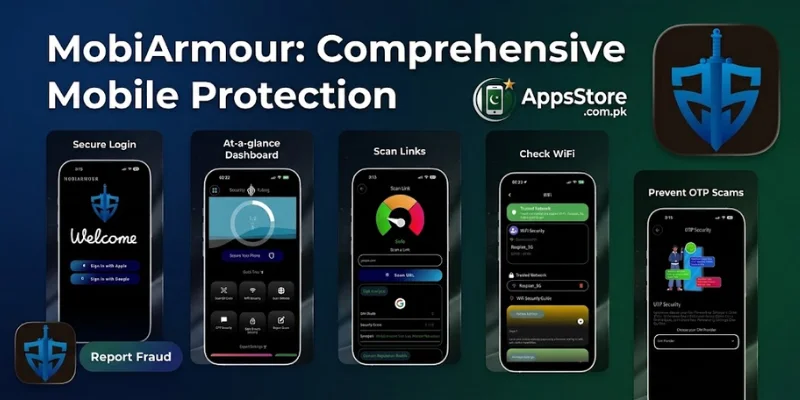
MobiArmour packs a wide range of security tools into a single, user-friendly interface. Here are its stand-out features:
Real-Time Link & URL Scanner
One of the most common ways users fall victim to cybercrime is by clicking on malicious links sent via WhatsApp, SMS, or email. MobiA rmour’s real-time link scanner evaluates URLs instantly, blocking dangerous phishing sites and fake login portals before you open them.
QR Code Scam Prevention
QR codes are widely used for digital payments and website access, but cybercriminals often tamper with them a threat known as quishing. MobiArmour scans QR codes prior to redirection, ensuring the destination URL is authentic and safe.
Data Breach and Leak Monitoring
With data breaches happening globally, your personal information or passwords might be exposed without your knowledge. MobiArmour includes a data breach checker that alerts you if your email address or personal credentials appear in dark web databases or known security leaks.
App Permission and Risk Analysis
Many apps demand excessive permissions that threaten user privacy such as accessing your camera, contacts, or location without a valid reason. Mobi Armour analyzes all installed applications, categorizes them by risk level Safe, Medium, High Risk, and highlights potential spyware or privacy vulnerabilities.
Wi-Fi Network Security Check
Unsecured public Wi-Fi networks in cafes, airports, and hotels are prime targets for man-in-the-middle attacks. MobiArmour scans connected Wi-Fi networks for vulnerabilities, encryption weaknesses, and potential eavesdroppers.
SIM & Call Forwarding Fraud Alert
Call forwarding scams allow attackers to intercept your incoming calls and one-time passwords OTPs. Mobi Armour provides protection features and diagnostic checks to help prevent unauthorized call forwarding and SIM-swap vulnerabilities.
Why Mobile Security Matters in Today’s Digital World
Smartphones are no longer just communication devices; they are digital wallets and identity hubs. Here is why proactive protection like Mobi Armour is crucial:
Rising phishing attacks smishing SMS phishing and social engineering attacks are rapidly growing, tricking users into revealing banking credentials.
Financial loss risks fake shopping sites and fraudulent payment gateways drain bank accounts instantly.
Privacy intrusions malicious mobile apps can silently track your location, log your keystrokes, and record audio in the background.
Public Wi-Fi Risks using public hotspots without verification exposes unencrypted sensitive data to local hackers.
Benefits of Using Mobi Armour for Smartphone Safety
Installing Mobi Armour provides several distinct advantages for everyday users and business professionals alike:
- All-in-One protection combines anti-phishing, QR safety, data leak monitoring, and Wi-Fi security into a single app.
- Lightweight and Fast optimized to run efficiently in the background without draining battery life or slowing down device performance.
- User friendly interface clear dashboards and instant threat alerts make cybersecurity simple for non-tech-savvy users.
- Proactive fraud prevention focuses on stopping scams at the entry point links, QR codes, Wi-Fi rather than reacting after damage is done.
How to Download MobiArmour APK
- Open the Google Play Store on Android or the Apple App Store on iOS devices.
- Type “MobiArmour” in the search bar and select the official cybersecurity application.
- You can also securely download the official APK file directly from AppsStore.com.pk.
- Tap the install button, grant the required permissions, and launch the app to enable real-time protection.
How to Get Started with Mobi Armour
Getting started with MobiArmour takes just a few steps:
- Download the App visit the official Google Play Store or Apple App Store and search for MobiArmour.
- Install and Launch open the app and follow the initial setup wizard to grant necessary permissions such as link detection.
- Run a Full Device Audit Execute a quick security scan to analyze installed applications, device settings, and potential vulnerabilities.
- Enable Real Time Shields Ensure real-time link protection and data breach monitoring are active for continuous safety.
Pros and Cons of Mobi Armour
To help you decide if MobiArmour is the right security solution for your smartphone, here is a breakdown of its main advantages and potential limitations:
| Pros (Advantages) | Cons (Limitations) |
| Comprehensive Anti-Phishing Effectively blocks scam links across WhatsApp, SMS, and emails. | Internet Required Most real-time scanners require an active internet connection to evaluate threats. |
| QR Code Protection Prevents malicious QR code scams (squishing) before opening unsafe sites. | Ad-Supported/Freemium Free version may include occasional ads or locked advanced features. |
| Lightweight & Efficient Low CPU and RAM footprint; doesn’t drain battery quickly. | False Positives May occasionally flag new or unrecognized benign URLs as suspicious. |
| Cross-Platform Support: Available for both Android and iOS devices. | Permissions Needed: Requires several system permissions (e.g., link detection, app accessibility) to operate effectively. |
| Data Breach Alerts: Notifies users if personal credentials appear in dark web leaks. |
Disclaimer
The information provided in this article is for educational and informational purposes only. While MobiArmour offers advanced security features to reduce cyber threats, no mobile application can guarantee 100% protection against all evolving security vulnerabilities, malware, or human error. Users are encouraged to maintain good cybersecurity practices, such as creating strong passwords, enabling two-factor authentication, and exercising caution when opening unknown links. This review is independent and not officially affiliated with or endorsed by Mobi Armour unless explicitly stated.
Final Verdict
If you frequently use your phone for mobile banking, online shopping, QR code scanning, or browsing public Wi-Fi networks, MobiArmour is a highly valuable addition to your smartphone. By blocking phishing attempts, alerting you to credential leaks, and auditing privacy risks, MobiArmour delivers complete digital peace of mind. Protecting your personal data starts with proactive cybersecurity and Mobi App serves as a reliable shield for your smartphone.
FAQs
Q1. Is MobiArmour free to use?
MobiArmour offers free basic security features to scan links, QR codes, and app risks. Premium subscription tiers or advanced security tools may be available for extended monitoring and automated threat detection.
Q2. Is MobiArmour available for both Android and iOS?
Yes, MobiArmour is designed for cross-platform compatibility and can be downloaded on both Android devices via the Google Play Store and iPhones via the Apple App Store.
Q3. Can MobiArmour replace traditional mobile antivirus software?
Yes. MobiArmour provides modern cybersecurity protection that goes beyond traditional virus scanning, specifically targeting phishing links, QR scams, data breaches, and unsafe app permissions.
Q4. Does MobiArmour slow down phone performance or drain battery?
No. The app is optimized for low resource usage, ensuring that background scans and real-time URL checks run smoothly without affecting device speed or battery life.
Download links
How to install MobiArmour Download For Android and IOS 2026 | Mobile Fraud Protection App APK?
1. Tap the downloaded MobiArmour Download For Android and IOS 2026 | Mobile Fraud Protection App APK file.
2. Touch install.
3. Follow the steps on the screen.