
Clock Vault App Download | Secret Photo locker & Video Locker 2026
September 28, 2026
22.13 MB
V69.0
Android 7.0+
1000

Description
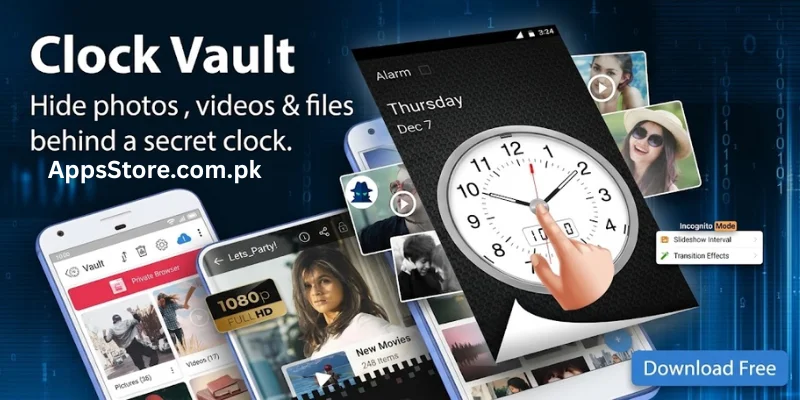
In an age where smartphones store our most personal memories, private conversations, and sensitive files, maintaining personal privacy is a top priority. While standard screen locks protect your phone from complete strangers, they often fail when sharing your device with family, friends, or colleagues. This is where Clock Vault Secret Photo Locker comes in as an essential privacy app for Android and iOS users.
Disguised as a fully functional, innocent-looking digital or analog desk clock, Clock locker provides an impenetrable layer of security for your private media. Below is everything you need to know about how this hidden vault app works, its core security features, setup process, and recovery options.
What is Clock Vault and How Does It Work?
Clock Vault also known as Secret Time Lock Vault is a stealthy privacy protection app designed to lock and hide personal photos, private video collections, sensitive documents, and secret contacts behind a fully operational clock interface.
Unlike standard app lockers that display an obvious passcode screen, Clock locker misleads unauthorized users. To a casual viewer, it appears to be nothing more than a simple clock app that shows the accurate time. However, setting the clock hands to a specific time chosen by you acts as the secret password to unlock your hidden media vault.
Also Read: If you love smart mobile tools like Clock Vault, check out our full guide on AR Meter App to measure real-world distances using your phone camera. It turns your device into an instant digital measuring tape!
Key Features of Clock Vault App
Clock Vault combines stealth design with advanced encryption features to ensure your private files remain completely inaccessible to prying eyes.
Incognito Clock Camouflage
The app’s primary strength is its stealth lock screen. The app launcher icon and interface appear as a simple timekeeper app, making it virtually impossible for anyone to guess that it holds hidden vault storage.
High Grade Vault Encryption
Files moved into the secret vault are shielded with advanced encryption algorithms. Photos and videos hidden inside Clock Vault are completely removed from your phone’s public gallery, Google Photos, and file manager.
Intruder Selfie Alert
If an unauthorized person attempts to guess your secret time password, the intruder selfie feature silently captures a photo of the person using your phone’s front camera along with a timestamp of the entry attempt.
Fake Password Protection (Decoy Vault)
Clock Vault allows you to create a decoy vault with a secondary fake time password. If someone forces you to open the app, entering the fake password reveals a dummy storage area with harmless photos, keeping your real vault completely secret.
Built in Private Browser and Media Player
Private Web Browser Surf the web without leaving history, cookies, or cache on your device.
In App Media Viewer Play hidden videos and view high-resolution photos directly inside the secure vault without exporting them back to your gallery.
Fingerprint Unlock Support
For quick access without manually moving the clock hands every time, you can enable biometrics like fingerprint unlock or face unlock on supported mobile devices.
How to Download and Install Clock Vault Safely
- Open play store on your android and app store on your IOS devices.
- Search for the app in the top search bar, type Clock Vault or Secret Time Lock Photo Vault.
- Select the authentic app Look for the app with high ratings (4.5+ stars), millions of downloads, and a publisher listed as a verified tools developer (such as WSR Arts or official security labs).
- Tap install click the green install button. They will automatically verify, download, and install the application onto your device.
- Launch and grant permissions tap open, grant the required file storage access permissions, and proceed with setting up your initial secret time lock.
Key Benefits Why You Need Clock Locker on Your Phone
Using Clock Vault offers significant advantages over basic gallery locks
Peace of mind Hand your phone over for photos or gaming without worrying about personal media being exposed.
Double layered security combines visual deception with strong file encryption to keep your data safe even if your device is lost or stolen.
No storage overhead securely store media locally without cluttering your cloud accounts or public image galleries.
All in one privacy suite offers media hiding, app locking, private browsing, and intruder tracking within a single light application.
How to Set Up Clock Vault
Setting up Clock Vault is quick and straightforward:
Set your secret time password open the app, move the clock hands to your desired time setting, and press the center button to register your password. Re enter to confirm.
Configure recovery options set up a recovery email address or security question in case you forget your combination.
Grant necessary permissions grant storage access permissions so the app can move and encrypt files on your storage drive.
Import files into vault tap the “+” icon inside the app to import photos, videos, and documents directly into your secure vault.
Essential Tips for Keeping Your Vault Secure
To avoid losing access to your hidden files, keep these practical tips in mind:
Never clear app data or uninstall directly always unhide/export your photos and videos before uninstalling the app or clearing device storage data.
Keep recovery information updated ensure your linked email address is active to recover forgotten passwords easily.
Disable junk cleaners for vault folders exclude Clock Vault directories from third-party storage cleaning apps to prevent accidental file deletion.
How to Recover Passwords and Unhide Files
How to Reset a Forgotten Password
If you forget your secret clock hand combination, do not panic or uninstall the application. Follow this recovery procedure:
- Open the Clock Vault app.
- Set the clock time manually to 10:10.
- Press the center button of the clock.
- The application will automatically open the password recovery screen.
- Enter the answer to your custom security question OR tap send recovery code to email.
- Retrieve the verification code sent to your registered inbox, enter it into the app, and create a new secret time password.
How to Properly Unhide (Export) Files Back to Public Gallery
- Unlock your Clock Vault using your time passcode or fingerprint.
- Open the folder containing the media you wish to restore.
- Select the photos or videos by checking their tick boxes.
- Tap the Unlock / Unhide (Eye Icon) button.
- Choose the destination directory on your device storage. The app will decrypt the files and restore them to your public gallery.
Important Tips and Troubleshooting Guidelines
To avoid accidental file loss, keep these crucial guidelines in mind:
- Do NOT Clear App Data or Cache Carelessly: Clearing system data via phone settings can destroy encryption keys and result in permanent loss of hidden media.
- Unhide Files Before Uninstalling: If you plan to switch phones, factory reset your device, or delete the app, always unhide and export all your media files first.
- Enable Uninstall Protection: Inside app settings, enable Device Administrator / Anti-Uninstall Protection to prevent unauthorized users or cleaner apps from removing Clock Vault without your master password.
Pros and Cons of Clock Vault App
| Category | Pros | Cons |
| Camouflage & Design | Unobtrusive Camouflage App operates and looks like a working clock on your home screen. | Manual Clock Hands Alignment Aligning clock hands manually can take longer than entering a quick 4-digit PIN. |
| Security & Privacy | Multi-Layer Security Includes decoy vault, intruder selfie snapshot, biometric access, and local file encryption. | Risk of Permanent File Loss Deleting or uninstalling the app without unhiding files erases encrypted media permanently. |
| Offline Safety | 100% Offline Storage: Keeps files stored locally on phone storage, eliminating risk of cloud data breaches. | No Automatic Cloud Backup: If your phone breaks or gets lost, files inside the vault cannot be recovered from the cloud. |
| Features & Utilities | Built-in Private Utilities: Features a built-in incognito web browser, photo viewer, and media player. | Ad-Supported Free Version: Free tier includes interstitial ads and pop-ups during operation. |
| Recovery & Safety | Emergency Password Recovery: Easy password reset via secret code 10:10 and registered recovery email. | Requires Strict Permissions: Needs full storage access to hide and encrypt files properly across the system. |
Conclusion
If you are looking for an effective, stealthy, and user-friendly solution to protect personal media, Clock Vault (Hide Photos, Videos) is an outstanding choice. By disguising itself as an everyday utility while delivering bank-grade file protection, it ensures your private memories remain exclusively yours. Download Clock Vault today and take complete control over your mobile privacy.
Frequently Asked Questions (FAQs)
Is Clock Vault free to use?
Yes, Clock Vault offers a free version with all essential media-hiding and encryption capabilities. Optional premium features may offer ad-free browsing and advanced intrusion controls.
What happens if I forget my secret clock password?
You can reset your password by entering 10:10 or pressing the center button on the clock face (depending on the version) and verifying your security question or email recovery code.
Are my hidden files stored online on cloud servers?
No, Clock Vault stores all hidden photos and videos locally on your device’s encrypted storage. Your personal data is not uploaded to external cloud servers, ensuring full local privacy.
Will my hidden media be visible if I connect my phone to a PC?
No. Encrypted files inside the Clock Vault are hidden from Windows File Explorer, macOS Finder, and standard mobile file managers.
How do I unhide or restore my photos and videos back to the gallery?
Open the vault, select the media items you wish to restore, and tap the “Unhide” or “Unlock” icon. The files will immediately return to their original location in your device gallery.
What's new
Clock Vault: How to Hide Photos, Videos, and Private Data Behind a Secret Time Lock
In an age where smartphones store our most personal memories, private conversations, and sensitive files, maintaining personal privacy is a top priority. While standard screen locks protect your phone from complete strangers, they often fail when sharing your device with family, friends, or colleagues. This is where Clock Vault Secret Photo Locker comes in as an essential privacy app for Android and iOS users.
Disguised as a fully functional, innocent-looking digital or analog desk clock, Clock Vault provides an impenetrable layer of security for your private media. Below is everything you need to know about how this hidden vault app works, its core security features, setup process, and recovery options.
What is Clock Vault and How Does It Work?
Clock Vault also known as Secret Time Lock Vault is a stealthy privacy protection app designed to lock and hide personal photos, private video collections, sensitive documents, and secret contacts behind a fully operational clock interface.
Unlike standard app lockers that display an obvious passcode screen, Clock Vault misleads unauthorized users. To a casual viewer, it appears to be nothing more than a simple clock app that shows the accurate time. However, setting the clock hands to a specific time chosen by you acts as the secret password to unlock your hidden media vault.
Key Features of Clock Vault App
Clock Vault combines stealth design with advanced encryption features to ensure your private files remain completely inaccessible to prying eyes.
Incognito Clock Camouflage
The app’s primary strength is its stealth lock screen. The app launcher icon and interface appear as a simple timekeeper app, making it virtually impossible for anyone to guess that it holds hidden vault storage.
High-Grade Vault Encryption
Files moved into the secret vault are shielded with advanced encryption algorithms. Photos and videos hidden inside Clock Vault are completely removed from your phone’s public gallery, Google Photos, and file manager.
Intruder Selfie Alert
If an unauthorized person attempts to guess your secret time password, the intruder selfie feature silently captures a photo of the person using your phone’s front camera along with a timestamp of the entry attempt.
Fake Password Protection (Decoy Vault)
Clock Vault allows you to create a decoy vault with a secondary fake time password. If someone forces you to open the app, entering the fake password reveals a dummy storage area with harmless photos, keeping your real vault completely secret.
Built in Private Browser and Media Player
Private Web Browser Surf the web without leaving history, cookies, or cache on your device.
In App Media Viewer Play hidden videos and view high-resolution photos directly inside the secure vault without exporting them back to your gallery.
Fingerprint Unlock Support
For quick access without manually moving the clock hands every time, you can enable biometrics like fingerprint unlock or face unlock on supported mobile devices.
How to Download and Install Clock Vault Safely
- Open play store on your android and app store on your IOS devices.
- Search for the app in the top search bar, type Clock Vault or Secret Time Lock Photo Vault.
- Select the authentic app Look for the app with high ratings (4.5+ stars), millions of downloads, and a publisher listed as a verified tools developer (such as WSR Arts or official security labs).
- Tap install click the green install button. They will automatically verify, download, and install the application onto your device.
- Launch and grant permissions tap open, grant the required file storage access permissions, and proceed with setting up your initial secret time lock.
Key Benefits Why You Need Clock Vault on Your Phone
Using Clock Vault offers significant advantages over basic gallery locks
Peace of mind Hand your phone over for photos or gaming without worrying about personal media being exposed.
Double layered security combines visual deception with strong file encryption to keep your data safe even if your device is lost or stolen.
No storage overhead securely store media locally without cluttering your cloud accounts or public image galleries.
All in one privacy suite offers media hiding, app locking, private browsing, and intruder tracking within a single light application.
How to Set Up Clock Vault
Setting up Clock Vault is quick and straightforward:
Set your secret time password open the app, move the clock hands to your desired time setting, and press the center button to register your password. Re enter to confirm.
Configure recovery options set up a recovery email address or security question in case you forget your combination.
Grant necessary permissions grant storage access permissions so the app can move and encrypt files on your storage drive.
Import files into vault tap the "+" icon inside the app to import photos, videos, and documents directly into your secure vault.
Essential Tips for Keeping Your Vault Secure
To avoid losing access to your hidden files, keep these practical tips in mind:
Never clear app data or uninstall directly always unhide/export your photos and videos before uninstalling the app or clearing device storage data.
Keep recovery information updated ensure your linked email address is active to recover forgotten passwords easily.
Disable junk cleaners for vault folders exclude Clock Vault directories from third-party storage cleaning apps to prevent accidental file deletion.
How to Recover Passwords and Unhide Files
How to Reset a Forgotten Password
If you forget your secret clock hand combination, do not panic or uninstall the application. Follow this recovery procedure:
- Open the Clock Vault app.
- Set the clock time manually to 10:10.
- Press the center button of the clock.
- The application will automatically open the password recovery screen.
- Enter the answer to your custom security question OR tap send recovery code to email.
- Retrieve the verification code sent to your registered inbox, enter it into the app, and create a new secret time password.
How to Properly Unhide (Export) Files Back to Public Gallery
- Unlock your Clock Vault using your time passcode or fingerprint.
- Open the folder containing the media you wish to restore.
- Select the photos or videos by checking their tick boxes.
- Tap the Unlock / Unhide (Eye Icon) button.
- Choose the destination directory on your device storage. The app will decrypt the files and restore them to your public gallery.
Important Tips and Troubleshooting Guidelines
To avoid accidental file loss, keep these crucial guidelines in mind:
- Do NOT Clear App Data or Cache Carelessly: Clearing system data via phone settings can destroy encryption keys and result in permanent loss of hidden media.
- Unhide Files Before Uninstalling: If you plan to switch phones, factory reset your device, or delete the app, always unhide and export all your media files first.
- Enable Uninstall Protection: Inside app settings, enable Device Administrator / Anti-Uninstall Protection to prevent unauthorized users or cleaner apps from removing Clock Vault without your master password.
Pros and Cons of Clock Vault App
| Category | Pros | Cons |
| Camouflage & Design | Unobtrusive Camouflage App operates and looks like a working clock on your home screen. | Manual Clock Hands Alignment Aligning clock hands manually can take longer than entering a quick 4-digit PIN. |
| Security & Privacy | Multi-Layer Security Includes decoy vault, intruder selfie snapshot, biometric access, and local file encryption. | Risk of Permanent File Loss Deleting or uninstalling the app without unhiding files erases encrypted media permanently. |
| Offline Safety | 100% Offline Storage: Keeps files stored locally on phone storage, eliminating risk of cloud data breaches. | No Automatic Cloud Backup: If your phone breaks or gets lost, files inside the vault cannot be recovered from the cloud. |
| Features & Utilities | Built-in Private Utilities: Features a built-in incognito web browser, photo viewer, and media player. | Ad-Supported Free Version: Free tier includes interstitial ads and pop-ups during operation. |
| Recovery & Safety | Emergency Password Recovery: Easy password reset via secret code 10:10 and registered recovery email. | Requires Strict Permissions: Needs full storage access to hide and encrypt files properly across the system. |
Conclusion
If you are looking for an effective, stealthy, and user-friendly solution to protect personal media, Clock Vault (Hide Photos, Videos) is an outstanding choice. By disguising itself as an everyday utility while delivering bank-grade file protection, it ensures your private memories remain exclusively yours. Download Clock Vault today and take complete control over your mobile privacy.
Frequently Asked Questions (FAQs)
Is Clock Vault free to use?
Yes, Clock Vault offers a free version with all essential media-hiding and encryption capabilities. Optional premium features may offer ad-free browsing and advanced intrusion controls.
What happens if I forget my secret clock password?
You can reset your password by entering 10:10 or pressing the center button on the clock face (depending on the version) and verifying your security question or email recovery code.
Are my hidden files stored online on cloud servers?
No, Clock Vault stores all hidden photos and videos locally on your device's encrypted storage. Your personal data is not uploaded to external cloud servers, ensuring full local privacy.
Will my hidden media be visible if I connect my phone to a PC?
No. Encrypted files inside the Clock Vault are hidden from Windows File Explorer, macOS Finder, and standard mobile file managers.
How do I unhide or restore my photos and videos back to the gallery?
Open the vault, select the media items you wish to restore, and tap the "Unhide" or "Unlock" icon. The files will immediately return to their original location in your device gallery.
Download links
How to install Clock Vault App Download | Secret Photo locker & Video Locker 2026 APK?
1. Tap the downloaded Clock Vault App Download | Secret Photo locker & Video Locker 2026 APK file.
2. Touch install.
3. Follow the steps on the screen.